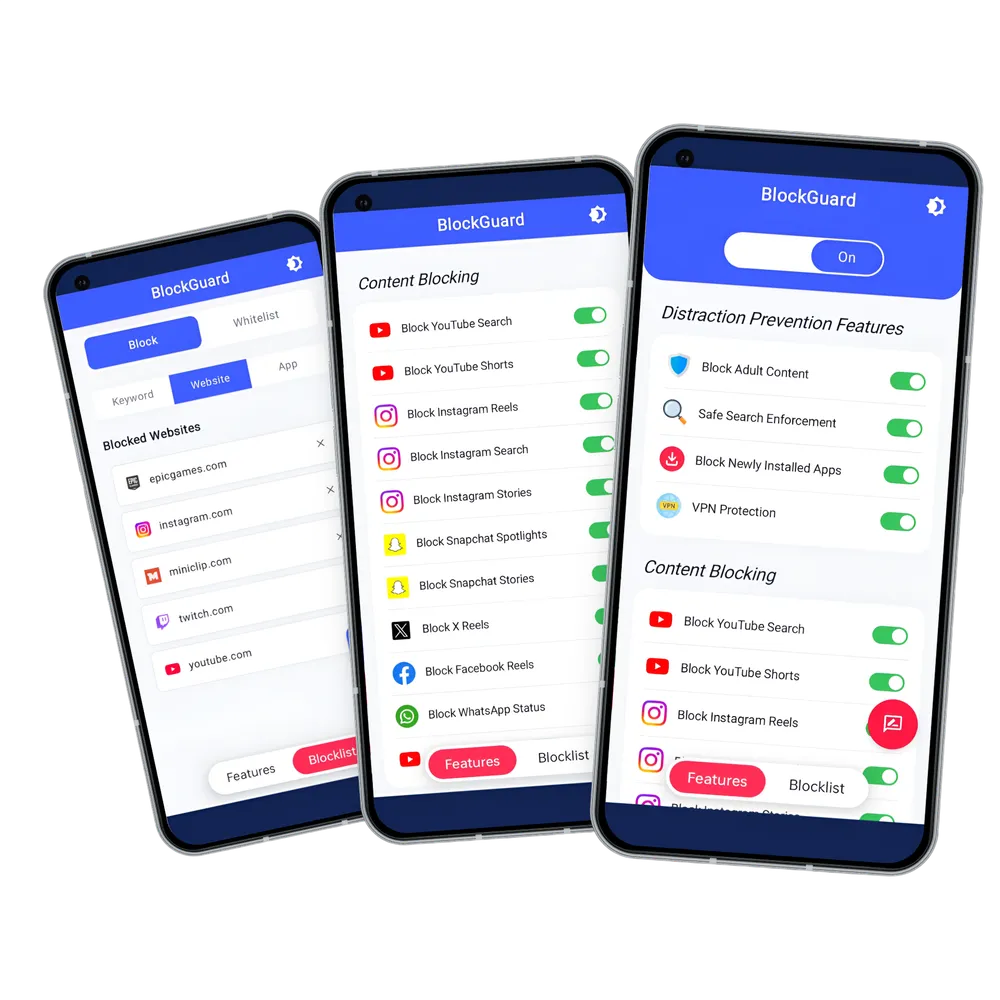
A Powerful Content Blocker Built for Android
BlockGuard helps you block adult content, filter harmful websites, and reduce distracting online content so you can stay focused and build healthier digital habits. Whether you're trying to avoid explicit content or simply want a safer browsing experience, BlockGuard protects your device from unwanted and distracting websites.
Unlike browser-only filters, BlockGuard works at the device level using a local VPN — so protection applies system-wide across all your browsers and apps, including Chrome, Firefox, Samsung Internet, and more. Your data is never routed through external servers, keeping your privacy fully intact.
What Makes BlockGuard the Best Free Android Porn Blocker?
More than just a porn blocker - a complete protection tool built for your entire Android device.
System-wide Blocking
Blocks adult content across all browsers and apps on your Android device, not just a single browser.
VPN-based Filtering
Uses a local VPN to filter explicit content at the network level without routing your data through external servers.
Password Protection
Lock app settings with a password to prevent impulsive disabling during moments of weakness.
App-level Controls
Block specific apps and websites individually to build a cleaner, more focused digital environment.
Incognito & Private Browsing
Protection stays active in private and incognito browsing modes across all supported browsers.
Lightweight & Battery Friendly
Designed to run efficiently in the background without draining your battery or slowing down your phone.
Perfect for Every Android User
BlockGuard is designed for anyone who wants greater control over what is accessible on their Android device — for safety, focus, or healthier digital habits.
Parents
Parents use BlockGuard to create a safer browsing environment on their children's Android devices. Because blocking happens system-wide through a local VPN, all browsers and apps are covered without needing to configure each one separately. Password protection prevents children from disabling or modifying the settings, giving parents reliable control with minimal ongoing effort.
Students
Students install BlockGuard to block distracting websites and explicit content during study sessions and exam periods. With custom blocklists covering social media, gaming, and adult content, BlockGuard helps you protect your attention throughout the day — across every browser and app on your phone.
Professionals
Professionals use BlockGuard on their work phones to reduce online distractions and maintain focus throughout the workday. By restricting access to time-consuming websites and apps at the device level, BlockGuard helps you stay productive without relying on willpower alone.
Individuals Building Healthier Digital Habits
Many people install BlockGuard as part of a broader effort to reduce exposure to explicit content and regain control of their digital life. BlockGuard is designed to protect users without collecting personal data — no tracking, no data storage — so you can build healthier internet habits with confidence that your privacy remains intact.
How to Block Porn on Android with BlockGuard
Get protected in less than a minute with simple setup and system-wide content filtering.
- Download BlockGuard: Install BlockGuard from Google Play and launch the app on your Android device.
- Grant Required Permissions: Enable Accessibility and VPN permissions so BlockGuard can detect and block adult content across apps, browsers, and search results.
- Customize Your Protection: Turn on adult content blocking, porn website filtering, YouTube Shorts blocking, Instagram Reels blocking, and other distraction-reduction features to match your goals.
- Browse Safely & Stay Focused: BlockGuard works silently in the background to block porn websites, adult content, Shorts, Reels, and online distractions while helping you build healthier digital habits.
Common Questions
Find answers to frequently asked questions about BlockGuard for Android.